Stock Traceability automatic notifications
Stock Traceability automatic notifications
BMS has an option for Stock Traceability.
Stock Traceability in myFulfillment lets you track your inventory at a sub-stock level using serial numbers (unique items like electronics) or lot/batch numbers (grouped items like food products with expiry dates) — so you always know exactly which specific unit or batch is in stock, has been shipped, or needs to be recalled.
That documentation will describe how to enable and update email notifications for the stocks levels on Stock Traceability.
Stock Traceability in myFulfillment lets you track your inventory at a sub-stock level using serial numbers (unique items like electronics) or lot/batch numbers (grouped items like food products with expiry dates) — so you always know exactly which specific unit or batch is in stock, has been shipped, or needs to be recalled.
That documentation will describe how to enable and update email notifications for the stocks levels on Stock Traceability.
Navigate to
Inventory at the top of the screen
> Stock Traceability
Inventory at the top of the screen
> Stock Traceability
> use the button at the bottom right Enable Automatic notification

If you do not have Stock Traceability enabled on your BMS myFulfillment subscription, the sub-menu "Stock Traceability" will not be present on the "Inventory" menu.
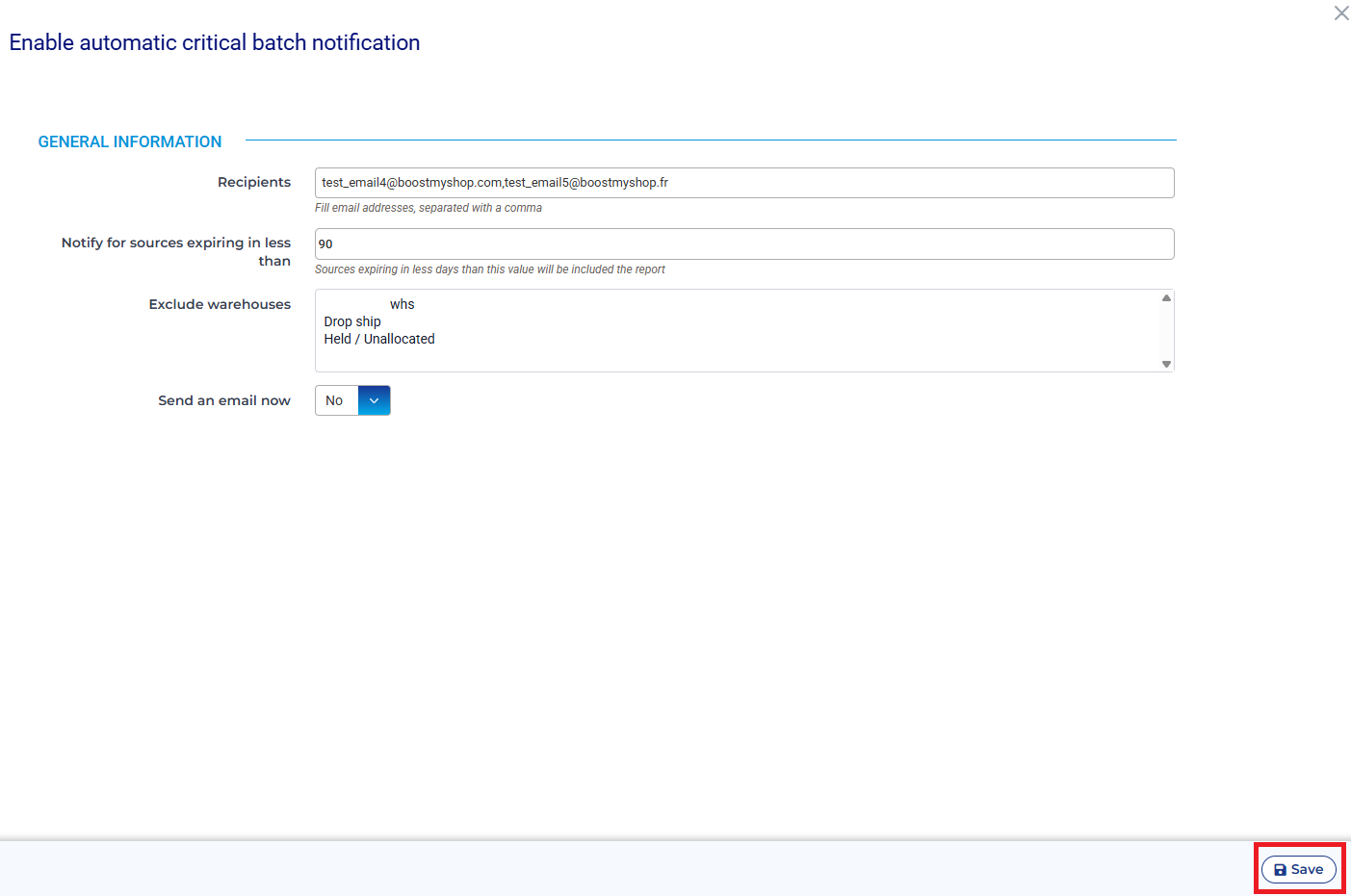
Once you've clicked on "Enable automatic notification" a side panel with those option appears :
- Recipients : List here the emails that should receive the notifications. Multiples emails are permitted, separated by commas.
- Recipients : List here the emails that should receive the notifications. Multiples emails are permitted, separated by commas.
- Notify for sources expiring in less than : delay in days from which BMS should notify
- Exclude warehouses : BMS will not check the excluded Warehouses for the present notification. Ctrl + click to select multiple.
- Send an email now : allow you to send an email right now, once you save.
- Send an email now : allow you to send an email right now, once you save.
It is required that you use the SAVE button at the bottom right of the screen once you've changed any of those four settings.