Unlocking a locked user
Checking if a user is locked
A user is locked out after a series of erroneous passwords. By default, that value is "locking at the 6th erroneous password".
A locked user is not informed that they are actually locked: the error message when they attempt to log in is the same as an erroneous password.
To check if a user is actually locked out, a user with admin rights needs to connect on BMS and navigate
>Setting (top right, circle with tools)
>Second to last tab, Users
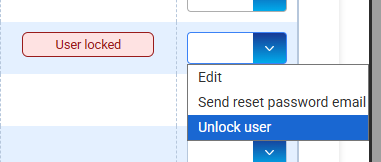
Then you can see the list of users, and a locked user will have a notification, highlighted in red below :
Unlocking a locked user
The locked user cannot unlock himself. There's no timed unlocking.
A user with admin rights needs to connect on BMS and navigate
>Setting (top right, circle with tools)
>Second to last tab, Users
Then on the line near the "user locked" notification, choose the "unlock user option" on the dropdown menu.
Other myFulfillment interfaces
BMS myFulfillment has a handful of other user interfaces that may not offer the unlock function.
In such cases, please contact BMS support on help@boostmyshop.com for unlocking a user.
In such cases, please contact BMS support on help@boostmyshop.com for unlocking a user.